In *Minecraft*, there are numerous reasons you might want to eliminate mobs, and using commands is the most straightforward method. The /kill command is your go-to tool, but it requires a bit of finesse to use effectively. Here's a comprehensive guide on how to use the /kill command to target all mobs in *Minecraft*.
How To Use the Kill Command to Kill All Mobs in Minecraft
Before diving into the commands, ensure you're playing on a world where cheats are enabled. If you're unsure how to activate cheats, skip to the next section for detailed instructions.
The /kill command is simple to execute; just type /kill into the chat box. However, without additional parameters, this command will only result in your own demise—not exactly what we're aiming for. To target specific entities, you'll need to add some syntax before the /kill command.
To kill all mobs, use the following command:
/kill @e[type=!minecraft:player]
Here, @e represents all entities, and the parameters within the brackets ensure that players are excluded from the kill command.
If you want to target a specific type of mob, such as chickens, the command would be:
/kill @e[type=minecraft:chicken]
You can also specify a distance to limit the range of the command. For example, to kill all mobs within 15 blocks in Java Edition, use:
/kill @e[distance=..15]
In Bedrock Edition, the equivalent command would be:
/kill @e[r=10]
To target a specific mob within a certain distance, such as sheep within 15 blocks in Java Edition, the command is:
/kill @e[distance=..15, type=minecraft:sheep]
For Bedrock Edition, it would be:
/kill @e[r=10, type=minecraft:sheep]
Both versions of *Minecraft* offer autocomplete features, making it easier to input these commands without memorizing them. With a bit of practice, you'll master the /kill command in no time.
There are other selectors besides @e that target different entities:
- @p – targets the nearest player
- @r – targets a random player
- @a – targets all players
- @e – targets all entities
- @s – targets yourself
How To Turn On Cheats/Commands in Minecraft
To use the /kill command, you must be in a *Minecraft* world with cheats enabled. Here's how to activate cheats in both Java and Bedrock Editions.
Java Edition
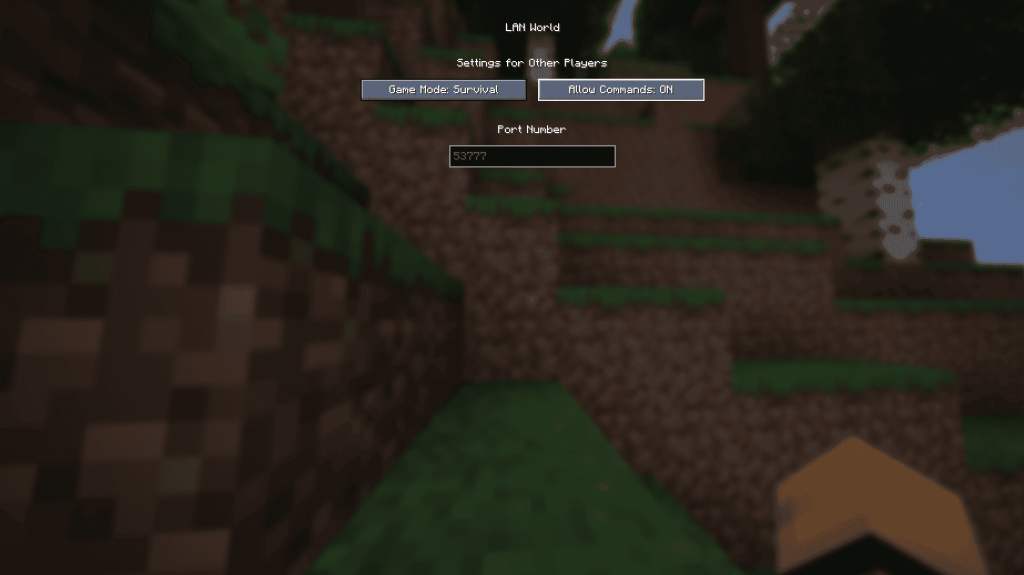
To enable cheats temporarily, load your world, press Esc, and select "Open to LAN." In the new menu, toggle "Allow Commands" to On. Note that you'll need to repeat this process each time you open your world. For a permanent solution, create a new world with cheats enabled:
- From the main menu, select Singleplayer.
- Choose your world and click "Re-create" at the bottom.
- In the new menu, set "Allow Commands" to On.
Bedrock Edition
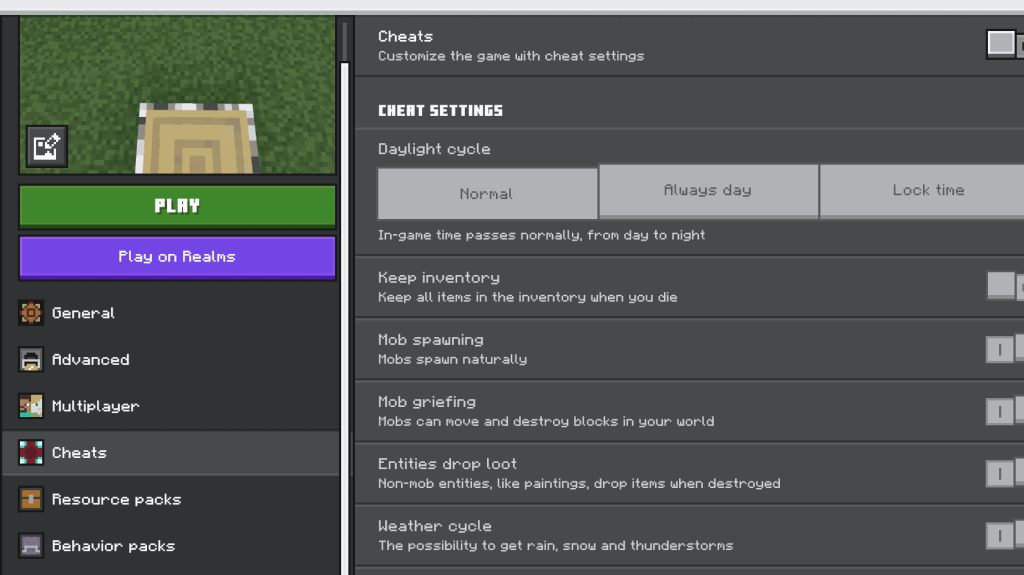
Enabling cheats in Bedrock Edition is straightforward. Navigate to your worlds list, click the pencil icon next to the world you want to modify, and find the "Cheats" option in the bottom right of the new menu. Toggle "Cheats" to On.
With these steps, you're now equipped with the knowledge to effectively use the /kill command to manage mobs in *Minecraft*. Whether you're clearing out a specific area or targeting particular mobs, these commands will enhance your gameplay experience.
*Minecraft is available now on PlayStation, Xbox, Nintendo Switch, PC, and mobile.*